配置Git
1
2
3
4
|
$ git config --global user.name "Your Name"

$ git config --global user.email "email@example.com"
|
创建版本库
1
2
3
4
5
6
7
8
|
$ mkdir learngit

$ cd learngit

$ pwd

/Users/michael/learngit
|
1
2
|
$ git commit -m "wrote a readme file"
|
版本管理
版本回退
1
2
3
4
5
6
7
8
|
$ git log --pretty=oneline
1094adb7b9b3807259d8cb349e7df1d4d6477073 (HEAD -> master) append GPL
e475afc93c209a690c39c13a46716e8fa000c366 add distributed
eaadf4e385e865d25c48e7ca9c8395c3f7dfaef0 wrote a readme file
|
1
2
|
$ git reset --hard HEAD^//根据参数回退对应
|
1
2
|
$ git reset --hard 1094a
|
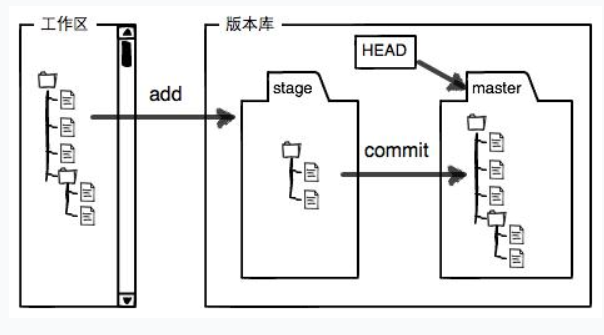
1
2
3
4
5
6
7
8
9
10
11
12
13
14
|
$ git status//查看状态
On branch master
Changes to be committed:
(use "git reset HEAD <file>..." to unstage)
new file: LICENSE
modified: readme.txt
|
管理修改
第一次修改 -> git add -> 第二次修改 -> git add -> git commit
1
2
|
$ git diff HEAD -- readme.txt //查看工作区和版本库最新版本区别
|
撤销修改
1
2
|
$ git checkout -- readme.txt//丢弃工作区修改
|
1
2
|
$ git reset HEAD readme.txt//把暂存区的修改撤销掉
|
删除文件
1
2
|
$ git checkout -- test.txx//此时是还原
|
远程仓库
添加远程库
1
2
|
$ git remote add origin https://github.com/Zesaen/learngit.git
|
1
2
|
$ git push -u origin master//第一次推送master分支时,加上了-u参数
|
1
2
|
$ git push origin master//此后本地提交
|
删除远程库
1
2
|
$ git remote -v//查看远程库
|
1
2
|
$ git remote rm origin//删除origin
|
从远程库克隆
分支管理
创建并合并
查看分支:git branch
创建分支:git branch <name>
切换分支:git switch <name>
创建+切换分支:git switch -c <name>
合并某分支到当前分支:git merge <name>
删除分支:git branch -d <name>
解决冲突
master分支和feature1分支各自都分别有新的提交
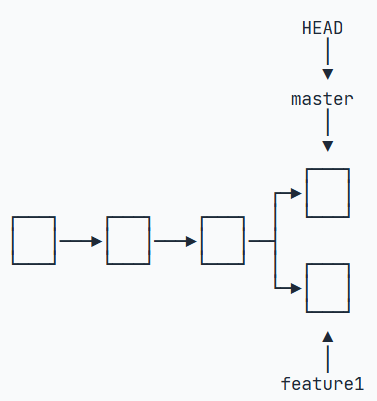
Git用<<<<<<<,=======,>>>>>>>标记出不同分支的内容
1
2
3
4
5
6
7
8
9
10
|
<<<<<<< HEAD
Creating a new branch is quick & simple.
=======
Creating a new branch is quick AND simple.
>>>>>>> feature1
|
Bug分支
略
强制删除分支
1
2
|
$ git branch -D <name>
|
多人协作
略
标签管理
1
2
|
$ git tag v1.0//给最新打标签
|
1
2
|
$ git tag v0.9 f52c633//给对应打标签
|
1
2
|
$ git show v0.9//查看标签信息
|
1
2
|
$ git tag -d v0.1//删除标签
|
操作标签
命令git push origin <tagname>可以推送一个本地标签;
命令git push origin --tags可以推送全部未推送过的本地标签;
命令git tag -d <tagname>可以删除一个本地标签;
命令git push origin :refs/tags/<tagname>可以删除一个远程标签。