📚 本文是《嵌入式 Linux 应用开发学习笔记》系列第 05 / 7 篇:Framebuffer 与文字显示。返回系列目录。
第5章、Framebuffer应用编程
5.1LCD操作原理
Framebuffer是Linux/Unix 下“最直接”的图形输出接口,可以通过Framebuffer驱动程序来控制LCD,Frame是帧,buffer是缓冲,意思是Framebuffer是一块内存,里面保存一帧图像的每一个像素值。
假设LCD分辨率1024*768,颜色32位,那
Framebuffer大小1024*768*32/8=3145728 字节
LCD操作原理:
驱动程序设置好 LCD 控制器
根据 LCD 的参数设置 LCD 控制器的时序、信号极性;
根据 LCD 分辨率、BPP 分配 Framebuffer
APP 使用 ioctl 获得 LCD 分辨率、BPP
APP 通过 mmap 映射 Framebuffer,在 Framebuffer 中写入数据
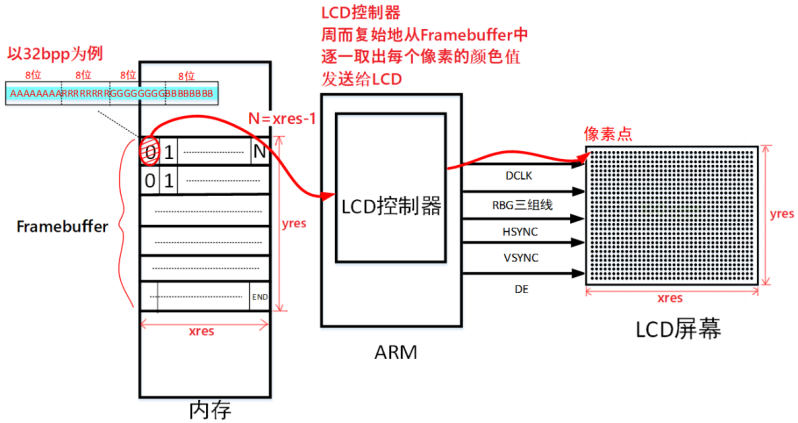
- 每一块数据与LCD每一个像素一一对应
- bpp:bits per pixel 每个像素用多少位表示颜色
假设需要设置 LCD 中坐标(x,y)处像素的颜色
(x,y)像素起始地址=fb_base+(xres*bpp/8)*y + x*bpp/8
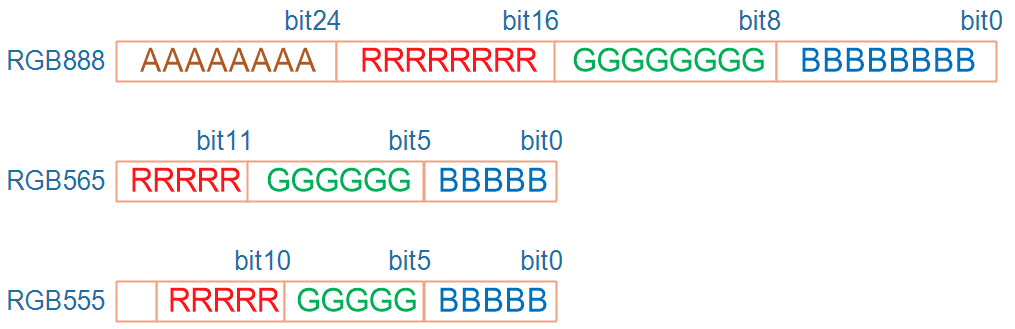
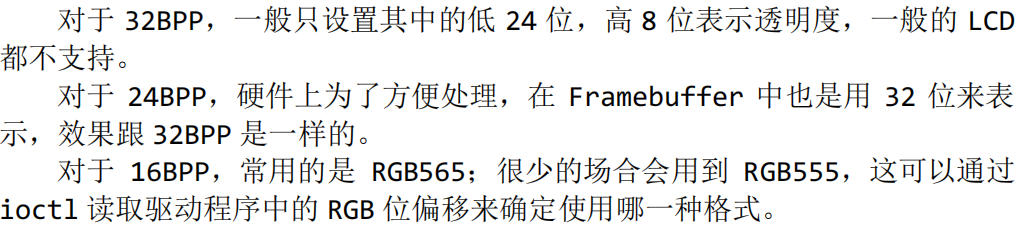
怎么显示颜色?
5.2 涉及的API函数
流程:打开 LCD 设备节点,获取分辨率等参数,映射Framebuffer,最后实现描点函数
5.2.2 ioctl函数
ioctl 是 Unix/Linux 里最“万能”的系统调用——“I/O 控制” 万金油,几乎任何驱动都能通过它暴露“命令 + 数据”接口
#include <sys/ioctl.h>
int ioctl(int fd, unsigned long request, …);
- fd 表示文件描述符
- request 表示与驱动程序交互的命令,用不同的命令控制驱动程序输出我们需要的数据
- … 表示可变参数 arg,根据 request 命令,设备驱动程序返回输出的数据
- 返回值,成功返回文件描述符,失败返回-1
5.2.3 mmap 函数
头文件:
#include <sys/mman.h>
函数原型:
void *mmap(void *addr, size_t length, int prot, int flags,int fd, off_t offset);
参数:
addr 表示指定映射的內存起始地址,通常设为 NULL 表示让系统自动选定地址,并在成功映射后返回该地址
length 表示将文件中多大的内容映射到内存中
prot 表示映射区域的保护方式,可以为以下 4 种方式的组合
◼ PROT_EXEC 映射区域可被执行
◼ PROT_READ 映射区域可被读出
◼ PROT_WRITE 映射区域可被写入
◼ PROT_NONE 映射区域不能存取
Flags 表示影响映射区域的不同特性,常用的有以下两种
◼ MAP_SHARED 表示对映射区域写入的数据会复制回文件内,原来的文
件会改变。
◼ MAP_PRIVATE 表示对映射区域的操作会产生一个映射文件的复制,对此区域的任何修改都不会写回原来的文件内容中。
返回值:若成功映射,将返回指向映射的区域的指针,失败将返回-1。
5.3程序
  1
  2
  3
  4
  5
  6
  7
  8
  9
 10
 11
 12
 13
 14
 15
 16
 17
 18
 19
 20
 21
 22
 23
 24
 25
 26
 27
 28
 29
 30
 31
 32
 33
 34
 35
 36
 37
 38
 39
 40
 41
 42
 43
 44
 45
 46
 47
 48
 49
 50
 51
 52
 53
 54
 55
 56
 57
 58
 59
 60
 61
 62
 63
 64
 65
 66
 67
 68
 69
 70
 71
 72
 73
 74
 75
 76
 77
 78
 79
 80
 81
 82
 83
 84
 85
 86
 87
 88
 89
 90
 91
 92
 93
 94
 95
 96
 97
 98
 99
100
101
102
103
104
105
106
| #include <sys/types.h> //open()
#include <sys/stat.h>
#include <fcntl.h>
#include <unistd.h> //close()
#include <stdio.h>
#include <string.h>
#include <sys/ioctl.h> //ioctl()
#include <sys/mman.h> //mmap()
#include <linux/fb.h>
static int fd_fb;
static struct fb_var_screeninfo var; /* Current var */
static int screen_size;
static unsigned char *fb_base;
static unsigned int line_width;
static unsigned int pixel_width;
void lcd_put_pixel(int x, int y, unsigned int color);
int main(int argc, char **argv)
{
int i;
fd_fb = open("/dev/fb0",O_RDWR);
if(fd_fb < 0)
{
printf("can't open /dev/fb0\n");
return -1;
}
if(ioctl(fd_fb, FBIOGET_VSCREENINFO, &var)<0)
{
printf("can't get var\n");
close(fd_fb);
return -1;
}
line_width = var.xres * var.bits_per_pixel / 8;
pixel_width = var.bits_per_pixel / 8;
screen_size = var.xres * var.yres * var.bits_per_pixel / 8;
fb_base = (unsigned char *)mmap(NULL , screen_size, PROT_READ | PROT_WRITE, MAP_SHARED, fd_fb, 0);
if(fb_base == (unsigned char *)-1)
{
printf("can't mmap\n");
return -1;
}
/* 清屏: 全部设为白色 */
memset(fb_base, 0xff, screen_size);
for (i = 0; i < 100; i++)
lcd_put_pixel(var.xres/2+i, var.yres/2, 0xFF0000);
munmap(fb_base , screen_size);
close(fd_fb);
return 0;
}
void lcd_put_pixel(int x, int y, unsigned int color)
{
unsigned char *pen_8 = fb_base+y*line_width+x*pixel_width;
unsigned short *pen_16;
unsigned int *pen_32;
unsigned int red, green, blue;
pen_16 = (unsigned short *)pen_8;
pen_32 = (unsigned int *)pen_8;
switch (var.bits_per_pixel)
{
case 8:
{
*pen_8 = color;
break;
}
case 16:
{
/* 565 */
red = (color >> 16) & 0xff;
green = (color >> 8) & 0xff;
blue = (color >> 0) & 0xff;
color = ((red >> 3) << 11) | ((green >> 2) << 5) | (blue >> 3);
*pen_16 = color;
break;
}
case 32:
{
*pen_32 = color;
break;
}
default:
{
printf("can't surport %dbpp\n", var.bits_per_pixel);
break;
}
}
}
|
5.4上机
arm-buildroot-linux-gnueabihf-gcc -o show_pixel show_pixel.c
adb上传后执行
第6章文字显示
6.1字符编码方式
6.1.1编码与字体
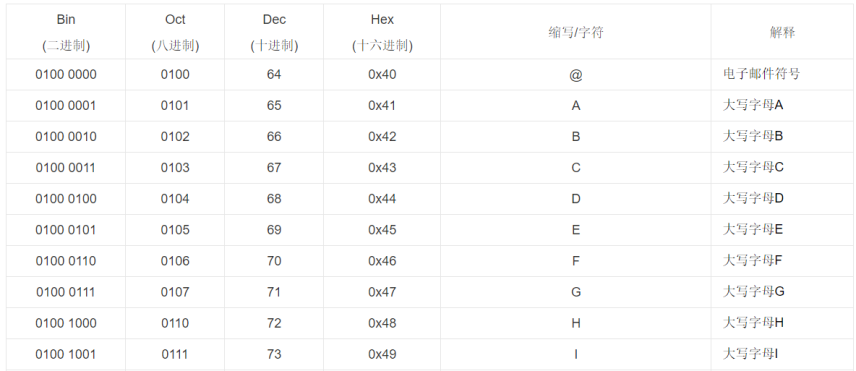
1.ASCII
常用字母就 26 个,区分大小写、加上标点符号也没超过 127 个,每个字符用一个字节来表示就足够了。一个字节的 7 位就可以表示 128 个数值,在 ASCII 码中最高位永远是 0
2.ANSI
强烈建议阅读:https://www.cnblogs.com/malecrab/p/5300486.html
如在中国大陆地区,ANSI 的默认编码是 GB2312;在港澳台地区默认编码是 BIG5
不同文字系统ANSI表示不同编码
3.UniCode
UNICODE 中的数值范围是 0x0000 至 0x10FFFF,有 1,114,111 即 100 多万个数值,可以表示 100 多万个字符,足够地球人使用了。
向下兼容ascii
6.1.2UniCode编码实现
“中” UNICODE 值是 0x4e2d,在 TXT 文件中怎么表示 0x4e2d?直接写入 0x4e2d?
不行!
比如在 TXT 文件中写入 2 字节数据“0x2d 0x4e”,它可以用来表示“中”字吗?
不能!它们对应 ASCII 字符“-N”。
问题的关键在于:怎么断字
那怎么表示一个unicode
1.使用3个字节
太浪费,比如字符 A 的 UNICOCDE 值是0x41,难道也用“0x41 0x00 0x00”这 3 个字节来表示?
2.UCS-2 Little endian/UTF-16 LE
能表示2^16=65536 个字符
Little endian 表示小字节序,数值中权重低的字节放在前面,比如字符“A 中”在 TXT 文件中的数值如下,其中的“A”使用“0x41 0x00”两字节表示;“中”使用“0x2d 0x4e”两字节表示。文件开头的“0xff 0xfe”表示“UTF-16 LE”。
3.UCS-2 Big endian/UTF-16 BE
与2相反
4.UTF8
上面两种方法:表示字符数量有限、对于ASCII字符浪费空间、如果某字节丢失后面字符都因为错位无法显示
使用UTF8可以解决上述所有问题。UTF8 是变长的编码方法,有 2 种 UTF8格式的文件:带有头部、不带头部。
对ascii字符在 UTF8 文件中直接用其 ASCII 码来表示,0x61 表示字符 a、0x62 表示字符 b
而3 个字节“0xe4 0xb8 0xad”表示的数值是 0x4e2d,对应“中”的 UNICODE 码
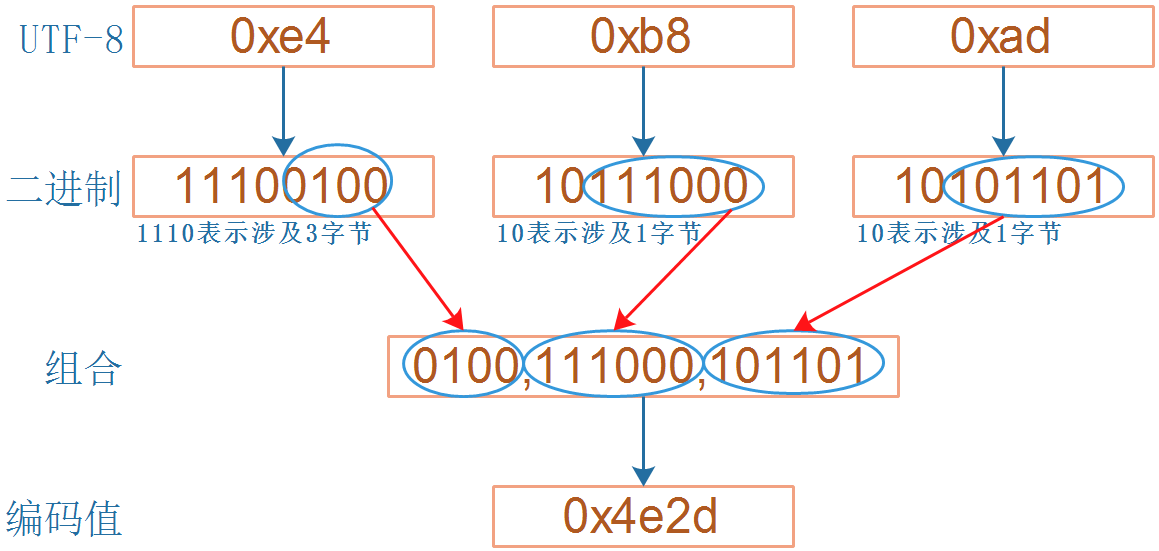
- 0xe4 的二进制是“11100100”,高位有 3 个 1,表示从当前字节起有3字节参与表示UNICODE;
- 0xb8 的二进制是“10111000”,高位有 1 个 1,表示从当前字节起有1字节参与表示UNICODE;
- 0xad 的二进制是“10101101”,高位有 1 个 1,表示从当前字节起有1字节参与表示 UNICODE
- 除去高位的“1110”、“10”、“10”后,剩下的二进制数组合起来得到“01001110001101”,它就是 0x4e2d,即“中”的 UNICODE 值
6.2 ASCII点阵显示
LCD中显示ASCII字符,首先要找到字符对应的点阵,在linux内核源码有这个文件
lib\fonts\font_8x16.c以数组形式保存字符点阵。
储存形式:
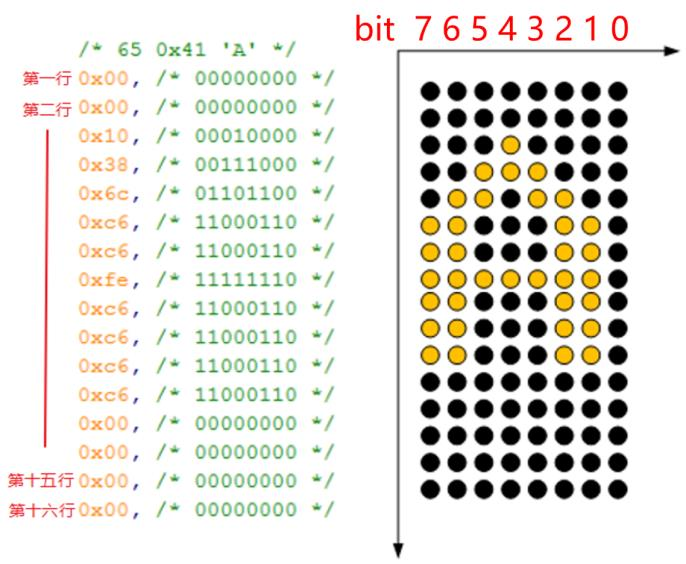
要显示某个字符时,根据它的 ASCII 码在 fontdata_8x16 数组中找到它的点阵,然后取出这 16 个字节去描画 16 行像素.
比如字符 A 的 ASCII 值是 0x41,那么从 fontdata_8x16[0x41*16]开始取其点阵数据
6.2.1获取点阵
对于字符c
unsigned char *dots = (unsigned char *)&fontdata_8x16[c*16];
6.2.2描点
因为有十六行,所以首先要有一个循环 16 次的大循环,然后每一行里有 8位,那么在每一个大循环里也需要一个循环 8 次的小循环。小循环里的判断单行的描点情况,如果是 1,就填充白色,如果是 0 就填充黑色。
  1
  2
  3
  4
  5
  6
  7
  8
  9
 10
 11
 12
 13
 14
 15
 16
 17
 18
 19
 20
 21
 22
 23
 24
 25
 26
 27
 28
 29
 30
 31
 32
 33
 34
 35
 36
 37
 38
 39
 40
 41
 42
 43
 44
 45
 46
 47
 48
 49
 50
 51
 52
 53
 54
 55
 56
 57
 58
 59
 60
 61
 62
 63
 64
 65
 66
 67
 68
 69
 70
 71
 72
 73
 74
 75
 76
 77
 78
 79
 80
 81
 82
 83
 84
 85
 86
 87
 88
 89
 90
 91
 92
 93
 94
 95
 96
 97
 98
 99
100
101
102
103
104
105
106
107
108
109
110
111
112
113
114
115
116
117
118
119
120
121
122
123
124
125
126
127
128
129
130
131
132
133
134
135
136
137
138
139
140
141
142
143
144
145
| #include <sys/types.h> //open()
#include <sys/stat.h>
#include <fcntl.h>
#include <unistd.h> //close()
#include <stdio.h>
#include <string.h>
#include <sys/ioctl.h> //ioctl()
#include <sys/mman.h> //mmap()
#include <linux/fb.h>
#define FONTDATAMAX 4096
static const unsigned char fontdata_8x16[FONTDATAMAX] = {
//...略
};
int fd_fb;
struct fb_var_screeninfo var; /* Current var */
int screen_size;
unsigned char *fbmem;
unsigned int line_width;
unsigned int pixel_width;
/**********************************************************************
* 函数名称: lcd_put_pixel
* 功能描述: 在LCD指定位置上输出指定颜色(描点)
* 输入参数: x坐标,y坐标,颜色
* 输出参数: 无
* 返 回 值: 会
* 修改日期 版本号 修改人 修改内容
* -----------------------------------------------
* 2020/05/12 V1.0 zh(angenao) 创建
***********************************************************************/
void lcd_put_pixel(int x, int y, unsigned int color)
{
unsigned char *pen_8 = fbmem+y*line_width+x*pixel_width;
unsigned short *pen_16;
unsigned int *pen_32;
unsigned int red, green, blue;
pen_16 = (unsigned short *)pen_8;
pen_32 = (unsigned int *)pen_8;
switch (var.bits_per_pixel)
{
case 8:
{
*pen_8 = color;
break;
}
case 16:
{
/* 565 */
red = (color >> 16) & 0xff;
green = (color >> 8) & 0xff;
blue = (color >> 0) & 0xff;
color = ((red >> 3) << 11) | ((green >> 2) << 5) | (blue >> 3);
*pen_16 = color;
break;
}
case 32:
{
*pen_32 = color;
break;
}
default:
{
printf("can't surport %dbpp\n", var.bits_per_pixel);
break;
}
}
}
/**********************************************************************
* 函数名称: lcd_put_ascii
* 功能描述: 在LCD指定位置上显示一个8*16的字符
* 输入参数: x坐标,y坐标,ascii码
* 输出参数: 无
* 返 回 值: 无
* 修改日期 版本号 修改人 修改内容
* -----------------------------------------------
* 2020/05/12 V1.0 zh(angenao) 创建
***********************************************************************/
void lcd_put_ascii(int x, int y, unsigned char c)
{
unsigned char *dots = (unsigned char *)&fontdata_8x16[c*16];
int i, b;
unsigned char byte;
for (i = 0; i < 16; i++)
{
byte = dots[i];
for (b = 7; b >= 0; b--)
{
if (byte & (1<<b))
{
/* show */
lcd_put_pixel(x+7-b, y+i, 0xffffff); /* 白 */
}
else
{
/* hide */
lcd_put_pixel(x+7-b, y+i, 0); /* 黑 */
}
}
}
}
int main(int argc, char **argv)
{
fd_fb = open("/dev/fb0", O_RDWR);
if (fd_fb < 0)
{
printf("can't open /dev/fb0\n");
return -1;
}
if (ioctl(fd_fb, FBIOGET_VSCREENINFO, &var))
{
printf("can't get var\n");
return -1;
}
line_width = var.xres * var.bits_per_pixel / 8;
pixel_width = var.bits_per_pixel / 8;
screen_size = var.xres * var.yres * var.bits_per_pixel / 8;
fbmem = (unsigned char *)mmap(NULL , screen_size, PROT_READ | PROT_WRITE, MAP_SHARED, fd_fb, 0);
if (fbmem == (unsigned char *)-1)
{
printf("can't mmap\n");
return -1;
}
/* 清屏: 全部设为黑色 */
memset(fbmem, 0, screen_size);
lcd_put_ascii(var.xres/2, var.yres/2, 'A'); /*在屏幕中间显示8*16的字母A*/
munmap(fbmem , screen_size);
close(fd_fb);
return 0;
}
|
6.2.3show_string
1
2
3
4
5
6
7
8
| void lcd_put_string(int x, int y, unsigned char * str)
{
while (*str) {
lcd_put_ascii(x, y, *str); /* 每字符宽 8 像素 */
x += 8; /* 横排前进 8 像素 */
++str;
}
}
|
6.3中文字符的点阵显示
6.3.1指定编码格式
test_charset_ansi.c
test_charset_utf8.c
可以对test_charset_ansi.c将原文件的GB2312格式,输出为可执行文件时以UTF8格式编码
gcc -finput-charset=GB2312 -fexec-charset=UTF-8 -o test_charset_ansi test_charset_ansi.c
如果不指定“-finput-charset”,GCC 就会默认 C 程序的编码方式为 UTF-8,即使你是以 ANSI 格式保存,也会被当作 UTF-8 来对待
如果不指定“-fexec-charset”,GCC 就会默认编译出的可执行程序中字符的编码方式为 UTF-8
如果“-finput-charset”与“-fexec-charset”不一样,编译器会进行格式转换
6.3.3汉字区位码
HZK16 这个文件,它是常用汉字的 16*16 点阵字库
每个汉字用32字节描述
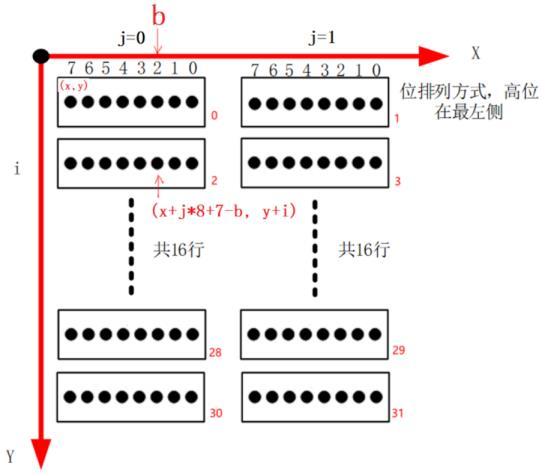
HZK16 中是以 GB2312 编码值来查找点阵以“中”字为例,它的编码值是“0xd6 0xd0”,其中的 0xd6 表示“区码”,表示在哪一个区:第“0xd6 - 0xa1”区;其中的 0xd0 表示“位码”,表示它是这个区里的哪一个字符:第“0xd0 -0xa1”个。每一个区有 94 个汉字。区位码从 0xa1 而不是从 0 开始,是为了兼容 ASCII 码
中字:第(0xd6-0xa1)*94+(0xd0-0xa1)个字符
6.4交叉编译程序:以freetype为例
使用 buildroot 来给 ARM 板编译程序、编译库会很简单,以后系统讲解buildroot 时再使用 buildroot
现在我们还是手工交叉编译 freetype
6.4.1程序运行的基本知识
1.编译程序时去哪找头文件
系统目录:交叉编译工具链的某include目录
自己指定:编译时-I dir
2.链接时去哪找库文件
系统目录:就是交叉编译工具链里的某个 lib 目录
自己指定:链接时用 “ -L dir ”
3.运行时去哪找库文件
系统目录:就是板子上的/lib、/usr/lib 目录
自己指定:运行程序用环境变量 LD_LIBRARY_PATH 指定
4.运行时不需要头文件,因此头文件不需要放板子上
6.4.2常见错误
1.头文件
编译时找不到头文件。在程序中这样包含头文件:#include <xxx.h>
怎么找到头文件
系统目录:交叉编译工具链的某个include目录
怎么找到系统目录?
echo 'main(){}'| arm-buildroot-linux-gnueabihf-gcc -E -v -
2.库文件
链接程序时如果有这样的提示:undefined reference to `xxx’,它表示 xxx 函数未定义
解决方法:
写出这个函数,或使用库函数,即在链接时指定库
怎么指定:
想链接 libabc.so,那链接时加上:-labc
库在哪:
- 系统目录:就是交叉编译工具链里的某个 lib 目录
- 以自己指定:链接时用 “ -L dir ”选项指定
3.运行问题
运行时找不到库,库在哪?
系统目录:就是板子上的/lib、/usr/lib 目录
自己指定:
export LD_LIBRARY_PATH=/xxx_dir; ./test
或
LD_LIBRARY_PATH=/xxx_dir ./test
6.4.3交叉编译万能命令
如果交叉编辑工具链的前缀是arm-buildroot-linux-gnueabihf-
交叉编译开源软件时,如果有configure文件

万能命令如下:
./configure --host=arm-buildroot-linux-gnueabihf --prefix=$PWD/tmp
make
make install
就可以在当前目录的 tmp 目录下看见 bin, lib, include 等目录,里面存有可执行程序、库、头文件
cp include/freetype2/* -rfd /home/book/100ask_imx6ull-sdk/ToolChain/arm-buildroot-linux-gnueabihf_sdk-buildroot/bin/../lib/gcc/arm-buildroot-linux-gnueabihf/7.5.0/include

cp lib/* -rfd /home/book/100ask_imx6ull-sdk/ToolChain/arm-buildroot-linux-gnueabihf_sdk-buildroot/bin/../lib/gcc/arm-buildroot-linux-gnueabihf/7.5.0/../../../../arm-buildroot-linux-gnueabihf/lib
6.5使用freetype显示单个文字
6.5.1矢量字体引入
使用点阵字库显示放大缩小会模糊甚至锯齿,为解决引入矢量字体
矢量字体分三步:
- 确定关键点
- 使用数学曲线连接头键点
- 填充闭合曲线内部空间

6.5.2在 LCD 上显示一个矢量字体
开源字体引擎库,统一接口访问多种字体格式文件,实现矢量字体显示。
一个文字的显示过程可以概括如下:
- 给定一个字符可以确定它的编码值(ASCII、UNICODE、GB2312);
- 设置字体大小;
- 根据编码值,从文件头部中通过 charmap 找到对应的关键点(glyph),它会根据字体大小调整关键点;
- 把关键点转换为位图点阵;
- 在 LCD 上显示出来
freetype初始化步骤如下:
- 初始化:FT_InitFreetype
- 加载(打开)字体 Face:FT_New_Face
- 设置字体大小:FT_Set_Char_Sizes 或 FT_Set_Pixel_Sizes
- 选择 charmap:FT_Select_Charmap
- 根据编码值 charcode 找到 glyph_index:glyph_index = FT_Get_Char_Index(face,charcode)
- 根据 glyph_index 取出 glyph:FT_Load_Glyph(face,glyph_index)
- 转为位图:FT_Render_Glyph
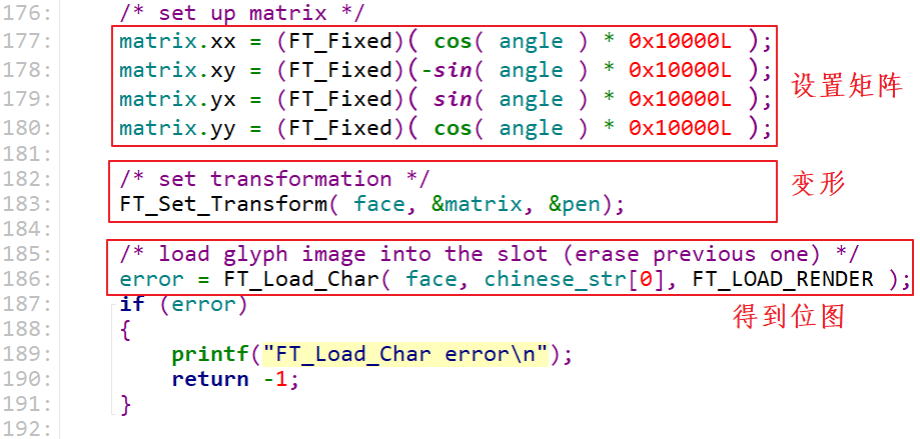
- 移动或旋转:FT_Set_Transform
- 最后显示出来
上面的5、6、7可以使用一个函数代替:FT_Load_Char(face, charcode, FT_LOAD_RENDER),它就可以得到位图
  1
  2
  3
  4
  5
  6
  7
  8
  9
 10
 11
 12
 13
 14
 15
 16
 17
 18
 19
 20
 21
 22
 23
 24
 25
 26
 27
 28
 29
 30
 31
 32
 33
 34
 35
 36
 37
 38
 39
 40
 41
 42
 43
 44
 45
 46
 47
 48
 49
 50
 51
 52
 53
 54
 55
 56
 57
 58
 59
 60
 61
 62
 63
 64
 65
 66
 67
 68
 69
 70
 71
 72
 73
 74
 75
 76
 77
 78
 79
 80
 81
 82
 83
 84
 85
 86
 87
 88
 89
 90
 91
 92
 93
 94
 95
 96
 97
 98
 99
100
101
102
103
104
105
106
107
108
109
110
111
112
113
114
115
116
117
118
119
120
121
122
123
124
125
126
127
128
129
130
131
132
133
134
135
136
137
138
139
140
141
142
143
144
145
146
147
148
149
150
151
152
153
154
155
156
157
158
159
| #include <sys/mman.h>
#include <sys/types.h>
#include <sys/stat.h>
#include <unistd.h>
#include <linux/fb.h>
#include <fcntl.h>
#include <stdio.h>
#include <string.h>
#include <math.h>
#include <wchar.h>
#include <sys/ioctl.h>
#include <ft2build.h>
#include FT_FREETYPE_H
#include FT_GLYPH_H
int fd_fb;
struct fb_var_screeninfo var; /* Current var */
int screen_size;
unsigned char *fbmem;
unsigned int line_width;
unsigned int pixel_width;
void lcd_put_pixel(int x, int y, unsigned int color)
{
unsigned char *pen_8 = fbmem+y*line_width+x*pixel_width;
unsigned short *pen_16;
unsigned int *pen_32;
unsigned int red, green, blue;
pen_16 = (unsigned short *)pen_8;
pen_32 = (unsigned int *)pen_8;
switch (var.bits_per_pixel)
{
case 8:
{
*pen_8 = color;
break;
}
case 16:
{
/* 565 */
red = (color >> 16) & 0xff;
green = (color >> 8) & 0xff;
blue = (color >> 0) & 0xff;
color = ((red >> 3) << 11) | ((green >> 2) << 5) | (blue >> 3);
*pen_16 = color;
break;
}
case 32:
{
*pen_32 = color;
break;
}
default:
{
printf("can't surport %dbpp\n", var.bits_per_pixel);
break;
}
}
}
void draw_bitmap(FT_Bitmap* bitmap,FT_Int x,FT_Int y)
{
FT_Int i, j, p, q;
FT_Int x_max = x + bitmap->width;
FT_Int y_max = y + bitmap->rows;
//printf("x = %d, y = %d\n", x, y);
for ( j = y, q = 0; j < y_max; j++, q++ )
{
for ( i = x, p = 0; i < x_max; i++, p++ )
{
if ( i < 0 || j < 0 ||i >= var.xres || j >= var.yres )
continue;
lcd_put_pixel(i, j, bitmap->buffer[q * bitmap->width + p]);
}
}
}
int main(int argc, char **argv)
{
wchar_t *chinese_str = L"繁";
FT_Library library;
FT_Face face;
int error;
FT_Vector pen;
FT_GlyphSlot slot;
int font_size = 24;
if (argc < 2)
{
printf("Usage : %s <font_file> [font_size]\n", argv[0]);
return -1;
}
if (argc == 3)
font_size = strtoul(argv[2], NULL, 0);
fd_fb = open("/dev/fb0", O_RDWR);
if (fd_fb < 0)
{
printf("can't open /dev/fb0\n");
return -1;
}
if (ioctl(fd_fb, FBIOGET_VSCREENINFO, &var))
{
printf("can't get var\n");
return -1;
}
line_width = var.xres * var.bits_per_pixel / 8;
pixel_width = var.bits_per_pixel / 8;
screen_size = var.xres * var.yres * var.bits_per_pixel / 8;
fbmem = (unsigned char *)mmap(NULL , screen_size, PROT_READ | PROT_WRITE, MAP_SHARED, fd_fb, 0);
if (fbmem == (unsigned char *)-1)
{
printf("can't mmap\n");
return -1;
}
/* 清屏: 全部设为黑色 */
memset(fbmem, 0, screen_size);
/* 显示矢量字体 */
error = FT_Init_FreeType( &library ); /* initialize library */
/* error handling omitted */
error = FT_New_Face( library, argv[1], 0, &face ); /* create face object */
/* error handling omitted */
slot = face->glyph;
FT_Set_Pixel_Sizes(face, font_size, 0);
/* 确定座标:
*/
//pen.x = 0;
//pen.y = 0;
/* set transformation */
//FT_Set_Transform( face, 0, &pen);
/* load glyph image into the slot (erase previous one) */
error = FT_Load_Char( face, chinese_str[0], FT_LOAD_RENDER );
if (error)
{
printf("FT_Load_Char error\n");
return -1;
}
draw_bitmap( &slot->bitmap,var.xres/2,var.yres/2);
return 0;
}
|
上机:
./freetype_show_font ./simsun.ttc
6.5.3在 LCD 上令矢量字体旋转某个角度
定义 2 个变量:角度、矩阵

设置角度值

设置矩阵、变形、加载位图
上机:
./freetype_show_font_angle ./simsun.ttc 90 200
6.6使用freetype显示一行文字
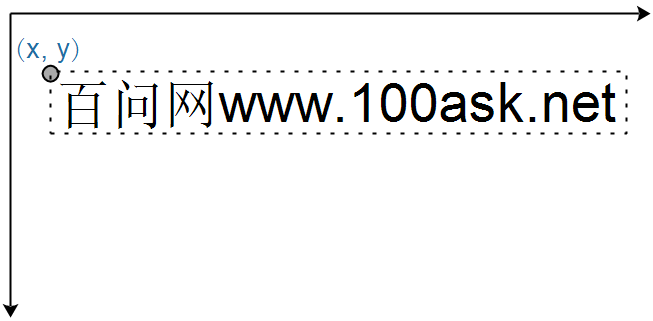
在 LCD 上指定一个左上角坐标(x, y),把一行文字显示出来。下图中,文字的外框用虚线表示,外框的左上角坐标就是(x, y)
6.6.1笛卡尔坐标系
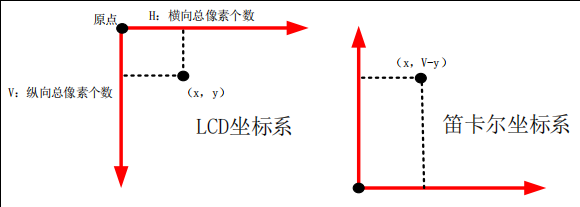
在 LCD 的坐标系中,原点在屏幕的左上角。对于笛卡尔坐标系,原点在左下角。freetype 使用笛卡尔坐标系,在显示时需要转换为 LCD 坐标系
在笛卡尔坐标系中坐标是(x, y),那么它在 LCD 坐标系中坐标值为(x, V-y)
6.6.2每个字符大小不同
所以在显示一行文字时,后面文字的位置会受到前面文字的影响
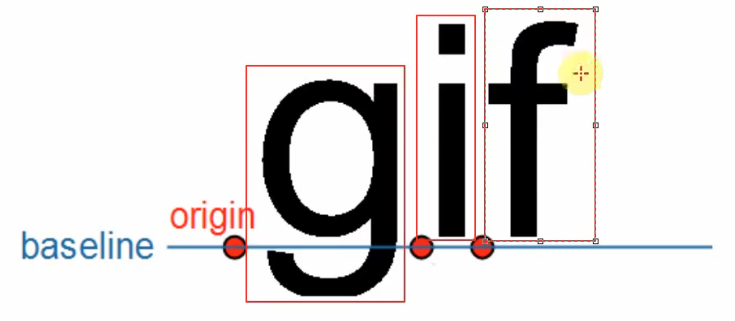
在显示一行文字时,这些文字会基于同一个基线来绘制位图:baseline
每一个字符都有它的原点(origin),比如上图中 baseline左边的黑色圆点就是字母“g”的原点。当前 origin 加上 advance 就可以得到下一个字符的 origin