📚 本文是《嵌入式 Linux 应用开发学习笔记》系列第 04 / 7 篇:文件 IO 与系统调用。返回系列目录。
第4章 文件IO
Linux一切皆文件,因此文件IO非常重要
Linux查看函数指令man
4.1文件IO分类
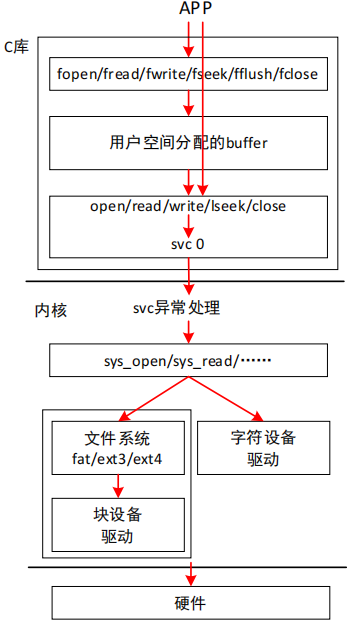
Linux上有两套函数:标准IO、系统调用IO
- 标准 IO 的相关函数是:fopen/fread/fwrite/fseek/fflush/fclose
- 系统调用 IO的相关函数是:open/read/write/lseek/fsync/close
两套接口来源:
系统调用IO是用户程序利用posix接口兼容访问Linux、Unix、Unix-like操作系统的功能,用于直接访问内核。
标准IO是C库的,但是为了兼容Windows用系统调用IO重新封装了。
标准IO引入了一个用户buffer。
读数据的话就读一个大数据在buffer,后续对其读取就在buffer里读,但是系统调用IO就必须多次向内核申请
4.2函数原型
4.2.1open()
1
2
3
4
5
6
| #include <sys/types.h>
#include <sys/stat.h>
#include <fcntl.h>
int open(const char *pathname, int flags);
int open(const char *pathname, int flags, mode_t
mode);
|
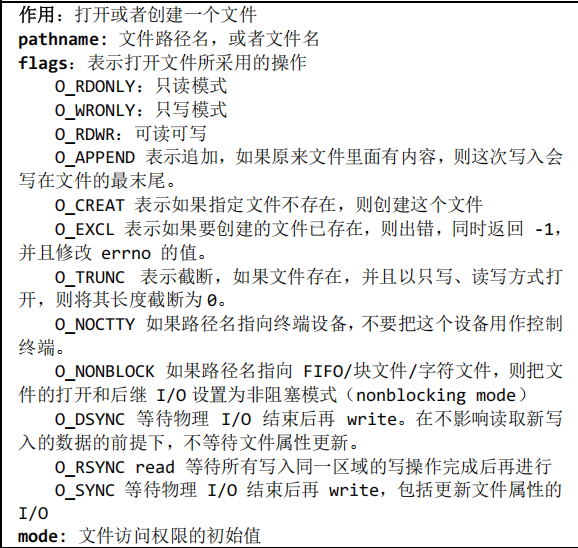
打开或创建一个文件
pathname:文件路径名或文件名
flags:打开方式和状态标志,通过位或操作
mode:仅当flags包含O_CREAT或 O_TMPFILE 时才需要提供,指定文件权限,指定方式同chmod
| 宏 | 含义 |
|---|
| 访问模式(三选一) | |
O_RDONLY | 只读 |
O_WRONLY | 只写 |
O_RDWR | 读写 |
| 创建与控制 | |
O_CREAT | 若文件不存在则创建,需提供 mode |
O_EXCL | 与 O_CREAT 合用,文件已存在时报错 |
O_TRUNC | 打开时把文件截断为 0 |
| 追加/非阻塞/同步 | |
O_APPEND | 每次写都追加到文件尾 |
O_NONBLOCK / O_NDELAY | 非阻塞模式 |
O_SYNC | 每次写都等待物理 I/O 完成 |
O_DSYNC | 仅同步数据,不含元数据 |
O_DIRECT | 绕过页缓存,直接用户缓冲到磁盘 |
O_CLOEXEC | 在执行 execve 时自动关闭 fd(防泄漏) |
 1
 2
 3
 4
 5
 6
 7
 8
 9
10
11
12
13
14
15
16
17
18
19
20
21
22
23
24
25
26
27
28
29
30
31
32
33
34
35
36
37
38
39
40
41
42
43
44
45
46
47
48
49
| //open
#include <sys/types.h>
#include <sys/stat.h>
#include <fcntl.h>
#include <stdio.h>
#include <string.h>
#include <errno.h>
//close
#include <unistd.h>
/*
* ./open 1.txt
* argc = 2
* argv[0] = "./open"
* argv[1] = "1.txt"
*/
int main(int argc, char **argv)
{
int fd;
if (argc != 2)
{
printf("Usage: %s <file>\n", argv[0]);
return -1;
}
//打开文件,若不存在则创建,且创建时截断,权限设为0777
fd = open(argv[1],O_RDWR|O_CREAT|TRUNC,0777);
if (fd < 0)
{
printf("can not open file %s\n", argv[1]);
printf("errno = %d\n", errno);
printf("err: %s\n", strerror(errno));
perror("open");
}
else
{
printf("fd = %d\n", fd);
}
while (1)
{
sleep(10);
}
close(fd);
return 0;
}
|
4.2.2write()
#include <unistd.h>
ssize_t write(int fd, const void *buf, size_t count);
fd:指定要写入的文件描述符
buf:缓冲区,一般是一个数组,该数组的内容写入文件
count:要写入的实际字符数
 1
 2
 3
 4
 5
 6
 7
 8
 9
10
11
12
13
14
15
16
17
18
19
20
21
22
23
24
25
26
27
28
29
30
31
32
33
34
35
36
| #include <stdio.h>
#include <sys/types.h>
#include <sys/stat.h>
#include <fcntl.h>
#include <unistd.h>
#include <string.h>
#include <errno.h>
int main(int argc,char *argv[])
{
int fd;
int i;
int len;
fd = open(argv[1],O_RDWR | O_CREAT | O_TRUNC,0777);
if (fd < 0)
{
printf("can not open file %s\n", argv[1]);
printf("errno = %d\n", errno);
printf("err: %s\n", strerror(errno));
perror("open");
}
else
{
printf("fd = %d\n", fd);
}
for (i = 2; i < argc; i++) {
len = write(fd,argv[i],strlen(argv[i]));
if (len != strlen(argv[i]))
{
perror("write");
break;
}
write(fd,"\r\n",2);
}
close(fd);
return 0;
}
|
4.2.3read()
1
2
| #include <unistd.h>
ssize_t read(int fd, void *buf, size_t count);
|
作用:从给定的文件描述符指定的文件中,读取 count 个字节的数据,存放至 buf 中。
fd:指定要读写的文件描述符
buf:缓冲区,一般是一个数组,用于存放读取的内容
count:一次要读取的最大字节数
4.2.4lseek()
#include <unistd.h>
off_t lseek(int fd, off_t offset, int whence);
fd:指定要偏移的文件描述符
offset:文件偏移量
whence:开始添加偏移 offset 的位置
SEEK_SET,offset 相对于文件开头进行偏移
SEEK_CUR,offset 相对文件当前位置进行偏移
SEEK_END,offset 相对于文件末尾进行偏移
4.2.5read()
#include <unistd.h>
ssize_t read(int fd, void *buf, size_t count);
作用:从给定的文件描述符指定的文件中,读取 count 个字节的数
据,存放至 buf 中。
fd:指定要读写的文件描述符
buf:缓冲区,一般是一个数组,用于存放读取的内容
count:一次要读取的最大字节数
 1
 2
 3
 4
 5
 6
 7
 8
 9
10
11
12
13
14
15
16
17
18
19
20
21
22
23
| #include <unistd.h>
#include <sys/types.h>
#include <sys/stat.h>
#include <fcntl.h>
#include <stdio.h>
#include <string.h>
#include <errno.h>
int main(int argc,char **argv)
{
int len;
int i;
unsigned char buf[100];
int fd = open(argv[1],O_RDONLY,0777);
while(1)
{
len = read(fd,buf,sizeof(buf)-1);
if(len==0) break; //表示读到结尾了
buf[len] = '\0';
printf("%s",buf);
}
close(fd);
}
|
4.4内部机制
用户空间应用层调用glibc给出的系统调用接口
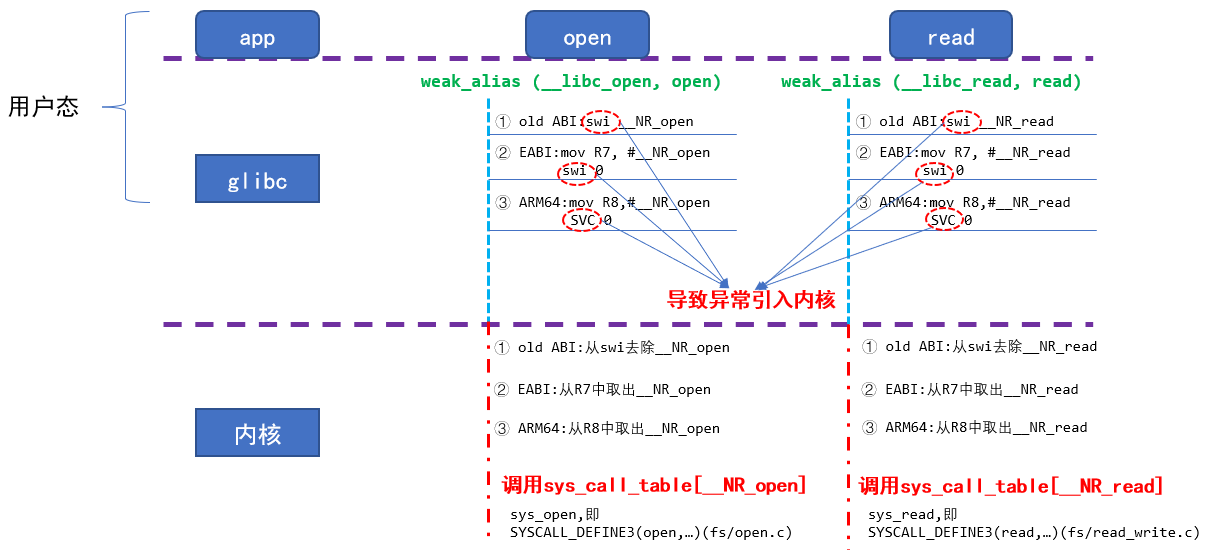
这些系统调用接口会触发异常引入内核
比如触发异常:swi/svc,并异常原因事先记录在某处
cpu发现异常后会调用内核提供的异常处理函数
他会进行分辨原因/处理异常
然后继续做自己的事
如SYSCALL_DEFINE为系统调用定义,3为参数个数

这个宏定义出这个函数
int sys_open(const char __user * filename,int flags,umode_t mode)
整体流程
即用户调用glibc的接口函数,接口函数触发异常,同时把异常原因记录在某些寄存器里面,cpu捕获到异常,根据异常的原因来调用对应的函数
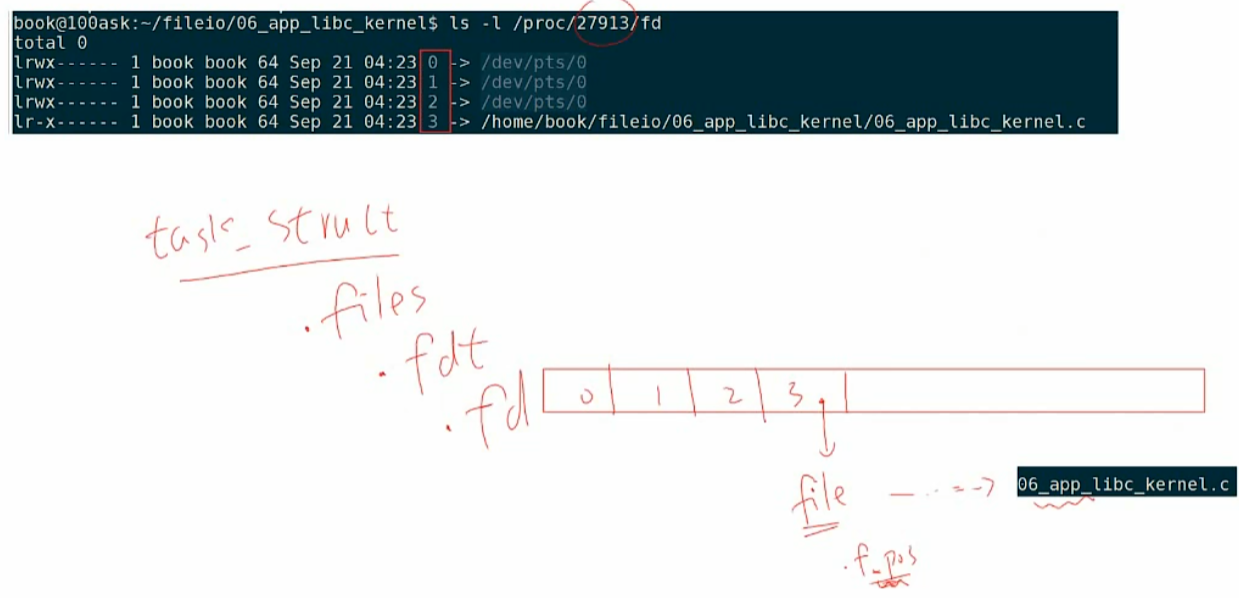
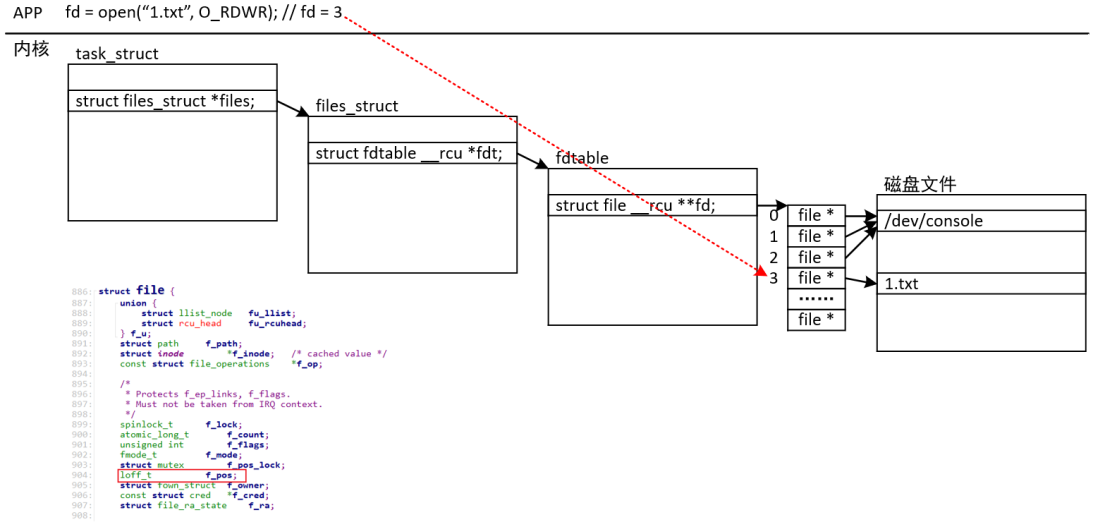
每个进程有自己的文件句柄空间
fd=3,是xx进程里fd=3的文件